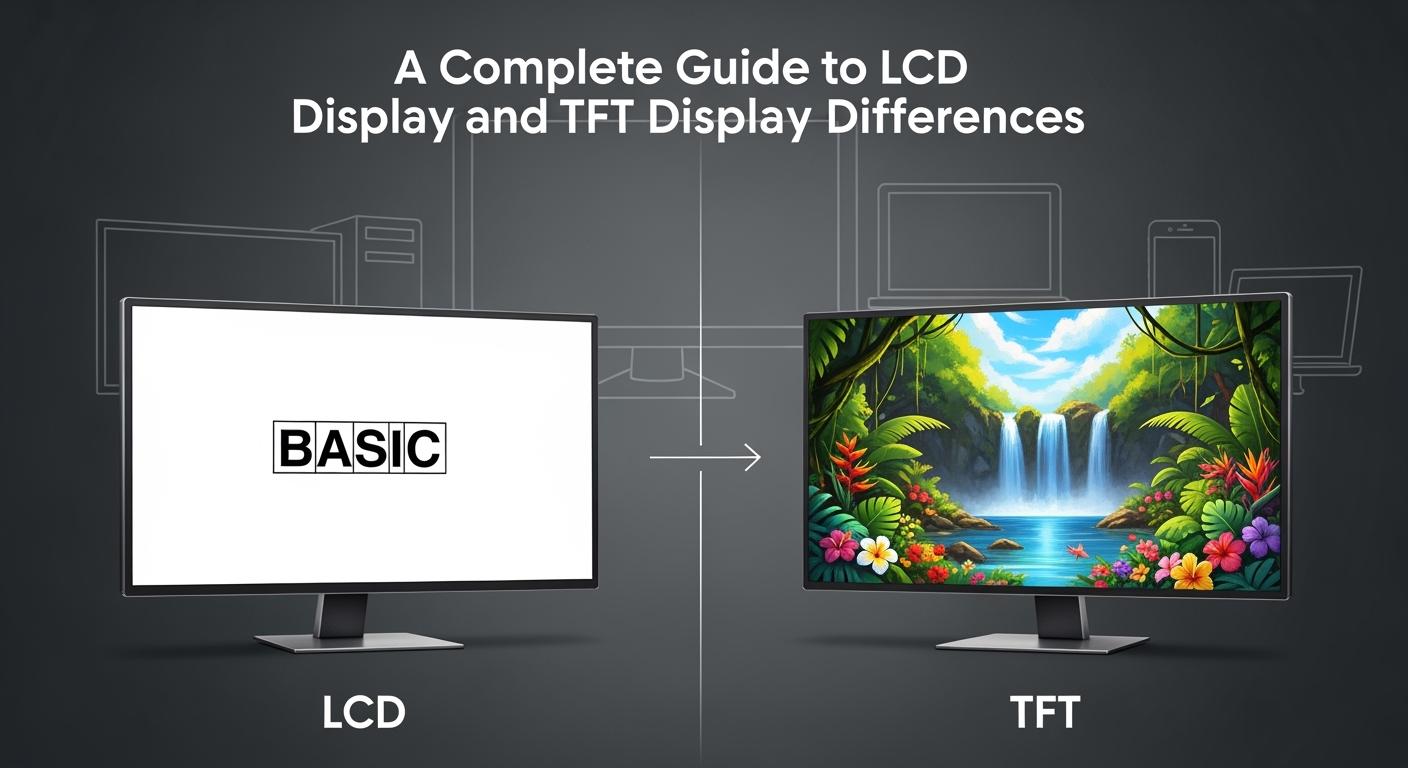
You can think of LCD Display as a broad category, like a family of screens. TFT belongs to this family, but not all LCDs use TFT technology. Picture LCD Display as a basic bike, while TFT acts like a bike with gears—offering better control and smoother rides. If you compare features side by side, TFT gives you sharper images and faster response times, but uses more power and costs more. Understanding these differences helps you make smart choices for your device, whether you need high performance or want to save battery.
|
Feature |
TFT Display |
LCD Display |
|---|---|---|
|
Image Quality |
Superior resolution and color accuracy |
Limited color and resolution |
|
Response Time |
Fast response time, ideal for dynamic content |
Slower response time, less ideal for animations |
|
Power Consumption |
Higher power consumption at high brightness |
Lower power usage, ideal for battery devices |
|
Cost |
Slightly more expensive than standard LCDs |
Generally more affordable |
|
Viewing Angles |
Limited in basic models |
Narrow viewing angles |
|
Use Cases |
High-performance applications, touch screens |
Basic displays, low-demand environments |
Key Takeaways
-
LCD displays are affordable and energy-efficient, making them ideal for basic tasks and budget-conscious users.
-
TFT displays offer superior image quality and faster response times, perfect for gaming and dynamic content.
-
Choose LCD for static content and low power use; select TFT for vibrant colors and interactive applications.
-
Consider your device's intended use and environment when selecting between LCD and TFT displays for optimal performance.
LCD Display Basics
What Is an LCD Display?
You interact with LCD Display technology every day, from calculators to TVs. LCD stands for Liquid Crystal Display. This type of screen uses a layer of liquid crystals sandwiched between two glass panels. When you apply voltage, these crystals change how light passes through, creating images you can see. LCD Display technology offers a thin, lightweight, and energy-efficient way to show information.
How LCD Displays Work
An LCD Display relies on several key layers and components to produce images:
-
Transparent electrodes apply voltage to the liquid crystals, letting you control each pixel.
-
The liquid crystal layer twists or aligns in response to voltage, which changes how much light passes through.
-
Color filters split each pixel into red, green, and blue sub-pixels, giving you full-color images.
-
Alignment layers keep the liquid crystals organized, so you get a clear picture without distortion.
-
Spacer beads maintain the right distance between glass layers, ensuring even image quality.
-
Polarizing films and a backlight module work together to make the display bright and easy to read.
When you turn on the display, the backlight shines through the layers. The liquid crystals adjust their orientation based on the voltage, which changes the light's polarization. This process lets you see different shades and colors on the screen.
Tip: The liquid crystal layer is the heart of the LCD Display. It controls how much light gets through, which directly affects image sharpness and contrast.
Types of LCD Displays
You can choose from several types of LCD Display, each with unique strengths:
-
TN (Twisted Nematic): Offers fast response times and lower cost. Many budget monitors and gaming screens use this type.
-
IPS (In-Plane Switching): Delivers better color accuracy and wider viewing angles. Most smartphones and high-end monitors use IPS panels.
-
VA (Vertical Alignment): Provides strong contrast and deep blacks. This type works well for mixed-use displays, like TVs and office monitors.
Each type of LCD Display uses a different structure to control how the liquid crystals move, which changes the viewing experience.
TFT Display Explained
What Is a TFT Display?
You may have seen the term "TFT" when shopping for monitors or smartphones. TFT stands for Thin-Film Transistor. This technology belongs to the LCD family, but it uses a special structure to improve performance. A TFT display uses tiny transistors and capacitors for each pixel. These components let you control every pixel individually, which means you get sharper images and smoother motion.
Note: TFT displays are called "active-matrix" LCDs because each pixel has its own switch. This design gives you better control and faster updates compared to older "passive-matrix" LCDs.
How TFT Technology Works
TFT technology places a thin-film transistor and a storage capacitor at every pixel on the display. This setup lets you activate each pixel directly and hold its charge until the next refresh. You get several benefits from this design:
-
Each pixel has its own transistor, so you can turn pixels on or off quickly.
-
The storage capacitor keeps the pixel stable, which reduces flicker and image blur.
-
You see faster response times, which is important for videos and games.
-
The display shows more colors and higher contrast, making images look vibrant.
TFT displays also use energy efficiently. The active-matrix design means you only use power where you need it, which helps extend battery life in portable devices.
TFT vs. Passive Matrix LCD
You might wonder how TFT compares to older passive matrix LCDs. The main difference comes from how each pixel gets controlled. In passive matrix displays, pixels share control lines, which slows down response and limits image quality. TFT displays give each pixel its own transistor, so you see better results.
|
Feature |
TFT Displays |
Passive Matrix LCD Displays |
|---|---|---|
|
Image Quality |
Superior with higher contrast and color accuracy |
Adequate for basic graphics, lower quality |
|
Response Time |
Typically under 25 ms |
100-300 ms, unsuitable for dynamic content |
|
Power Consumption |
Generally higher, but modern TFTs have improved efficiency |
Lower, especially in reflective configurations |
|
Cost |
Higher initial costs, decreasing gap with time |
Lower initial costs due to simpler manufacturing |
-
TFT displays support millions of colors and wide viewing angles, so you see clear images from almost any position.
-
Passive matrix LCDs often show ghosting and slow transitions, which makes them less suitable for fast-moving content.
-
You get a sharper, more vibrant display with TFT, especially for videos, games, and touchscreens.
LCD Display vs. TFT: Main Differences
Pixel Control and Matrix Type
You will notice a big difference in how LCD Display and TFT screens control their pixels. In a basic LCD Display, the screen uses a passive matrix. This means the display controls pixels with a grid of horizontal and vertical lines. The control is not precise, so you might see blurry images or slow updates.
TFT screens use an active matrix. Each pixel has its own transistor, which gives you direct control. This design leads to sharper images and faster response times. You get a much better experience, especially when you watch videos or play games.
|
Feature |
Active Matrix (TFT) |
Passive Matrix (Standard LCD Display) |
|---|---|---|
|
Pixel Control |
Each pixel has its own transistor for direct control |
Pixels share control lines, less precise |
|
Response Time |
1-5 milliseconds |
300-500 milliseconds |
|
Viewing Angles |
Up to 178 degrees |
Around 30 degrees |
|
Color Depth |
16.7 million colors |
4,096 colors |
-
Active matrix displays use hundreds of thousands of transistors for direct pixel control.
-
Passive matrix displays use only a few hundred control lines for all pixels.
-
You will see much faster response times and richer colors with active matrix technology.
Image Quality and Color
When you compare image quality, TFT technology stands out. The active matrix design lets you enjoy higher resolutions and sharper images. You will see clear text and vibrant photos, even on large screens. Passive matrix LCD Display panels often look fuzzy and show ghosting, especially with fast-moving content.
TFT screens support millions of colors. You get deep blacks, bright whites, and smooth gradients. This makes them perfect for watching movies, editing photos, or playing games. Standard LCD Display panels, especially older ones, show fewer colors and have lower contrast.
|
Parameter |
Description |
|---|---|
|
Contrast Ratio |
The ratio of brightness of full white to full black, e.g., 1000:1 for 200 cd/m² white and 0.2 cd/m² black. |
|
Color Gamut |
The range of colors a TFT-LCD can display, represented on a chromaticity diagram. |
-
TN panels offer fast response but limited color.
-
IPS panels give you the best color accuracy and wide viewing angles.
-
VA panels provide strong contrast and deep blacks.
Viewing Angles
Viewing angle is another area where TFT technology, especially with IPS panels, excels. If you look at a basic LCD Display from the side, colors may shift and the image can fade. This happens because passive matrix screens have narrow viewing angles.
TFT screens with IPS technology let you see the same colors and brightness from almost any angle. You can sit anywhere in the room and still enjoy a clear picture. This is important for TVs, monitors, and smartphones.
|
Technology |
Usable Viewing Angle |
|---|---|
|
TFT (TN) |
< 30 degrees |
|
IPS |
Up to 178 degrees |
Note: IPS technology aligns liquid crystals parallel to the screen, which allows for wide viewing angles and stable colors.
Refresh Rate and Response Time
Refresh rate and response time affect how smooth your display looks. The refresh rate tells you how many times per second the screen updates. Response time measures how quickly a pixel changes from one color to another.
TFT displays usually offer refresh rates from 60Hz up to 240Hz. A 60Hz refresh rate works well for web browsing and movies. Higher rates, like 120Hz or 144Hz, make games and fast videos look smoother. You will notice less motion blur and ghosting.
-
Refresh rate shows how many frames per second the display can show.
-
Response time shows how fast each pixel can change color.
-
High refresh rates and low response times give you the best experience for gaming and video.
-
For gaming, choose a refresh rate of at least 120Hz.
-
Look for a response time below 5ms for smooth visuals.
-
This combination helps you avoid blurring and improves reaction time.
Power Consumption
Power consumption matters, especially for portable devices. TFT screens use more power than standard LCD Display panels. This happens because each pixel has its own transistor, which needs energy. As screen size increases, the difference becomes more noticeable.
|
Screen Size |
LCD Power Consumption (W) |
TFT Power Consumption (W) |
|---|---|---|
|
15 inches |
18 |
20 |
|
22 inches |
40 |
42 |
|
32 inches |
70 |
72 |
|
50 inches |
150 |
152 |
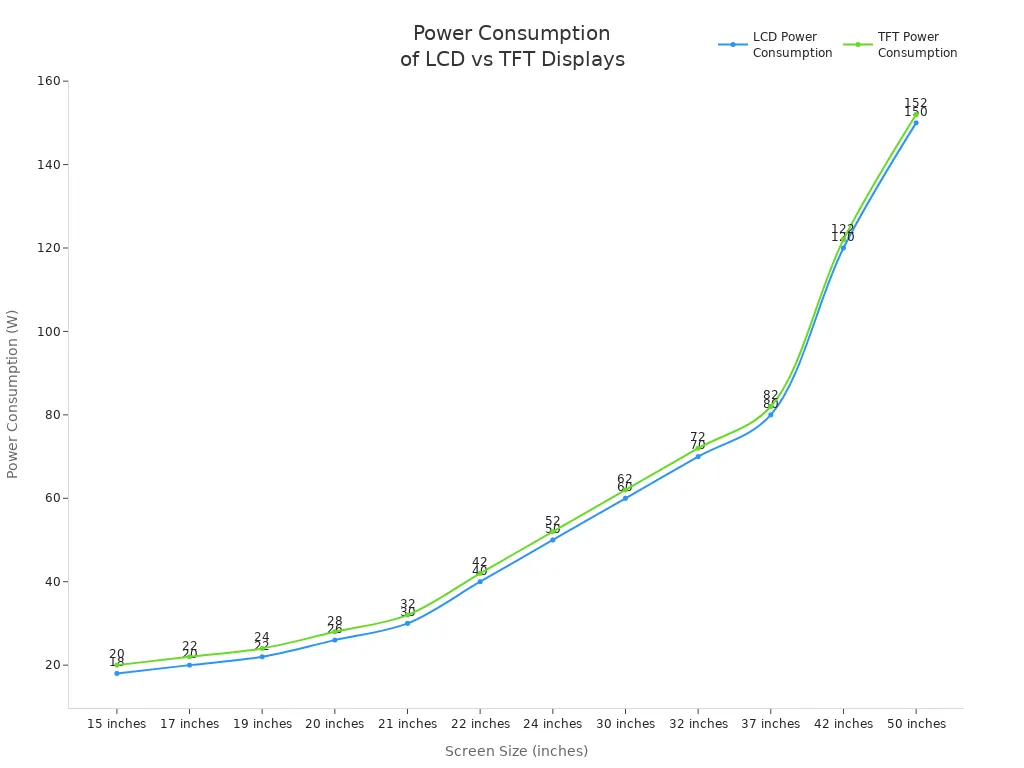
TFT screens give you better image quality and performance, but they can shorten battery life in laptops and tablets. If you want longer battery life, you may prefer a basic LCD Display or consider OLED technology, which uses even less power.
Tip: IPS panels in TFT displays improve viewing angles and color, but they may use slightly more power than TN panels.
Pros and Cons of LCD Display
LCD Display Advantages
You will find several reasons to choose an LCD Display for your device. These screens offer a balance of affordability, reliability, and energy savings. The table below highlights the main advantages:
|
Advantage |
Description |
|---|---|
|
Cost |
LCD displays have an affordable initial price, making them suitable for budget-conscious users. |
|
Availability |
They have a broad market presence and established reliability, ensuring easy access to parts and services. |
|
Energy Efficiency |
LCD technology is known for its energy efficiency, contributing to lower operational costs. |
You can easily find replacement parts or service for most models. Many schools, offices, and homes use these displays because they help save on electricity bills. If you want a screen that is both practical and widely supported, this technology gives you a dependable choice.
Tip: LCD displays work well in environments where you need to keep costs low and reliability high.
LCD Display Disadvantages
While LCD displays offer many benefits, you should also consider their limitations before making a decision. Here are some common drawbacks:
-
Resolution stays fixed, so images may look blurry if you change the screen size or scale.
-
Analog input models often need manual adjustment to avoid digital noise, and automatic controls may not always work well.
-
Limited viewing angles can cause colors and brightness to shift unless you look straight at the screen.
-
Producing deep blacks and rich colors can be difficult, especially in dark rooms.
-
Bright whites can become overloaded, leading to loss of detail in highlights.
-
Color and gray-scale accuracy may not meet the needs of professionals who require precise color matching.
-
Some screens may have weak or stuck pixels, and backlight can appear uneven.
-
Slow response times can cause motion blur or ghosting in fast-moving images.
-
Fixed aspect ratios may not fit all applications or content types.
-
Compared to older CRT monitors, LCDs can still cost more for similar screen sizes.
You should weigh these disadvantages against the benefits to decide if this display type fits your needs.
Pros and Cons of TFT Display
TFT Display Advantages
You will notice several advantages when you choose a TFT display for your device. These screens use thin-film transistors to control each pixel, which gives you precise image control. You can expect the following benefits:
-
You see higher contrast ratios, which means deeper blacks and brighter whites. This feature helps you view details in both dark and bright scenes.
-
Colors appear more vibrant and accurate. You can enjoy photos, videos, and graphics with lifelike quality.
-
TFT displays offer better overall image quality compared to passive-matrix LCDs. You get sharp text and clear visuals, even on large screens.
-
You experience smoother and faster image rendering. The higher refresh rates make these displays ideal for gaming, video editing, and professional applications that require quick image processing.
-
Each pixel responds quickly to changes. This reduces motion blur and ghosting, so you see crisp images during fast action scenes.
Tip: Many industrial and professional devices use TFT displays because they deliver reliable performance and excellent visual clarity.
TFT Display Disadvantages
While TFT displays offer impressive performance, you should also consider their drawbacks before making a decision. The table below highlights the main disadvantages:
|
Drawback |
Description |
|---|---|
|
Higher Costs |
You pay more for TFT displays because they require advanced manufacturing and higher production costs. |
|
Power Consumption |
These panels use more power, which can drain batteries faster in portable devices. |
|
Narrow Viewing Angles |
You may notice color shifts or reduced brightness if you view the screen from the side. |
|
Poor Color Saturation |
TFT displays often show less saturated colors compared to IPS LCD or AMOLED screens. |
You should weigh these disadvantages against the advantages. If you need top image quality and fast response, TFT displays serve you well. If you want to save power or reduce costs, you may prefer other display types.
Choosing the Right Display
Application Scenarios
You need to match the display type to your project’s requirements. LCD displays work well in situations where cost and power efficiency matter most. You often see them in calculators, basic monitors, and devices that show simple information. TFT displays shine in environments that demand high performance. You find them in smartphones, medical equipment, industrial controls, and gaming monitors. If your project involves touch interaction, dynamic graphics, or needs to operate outdoors, TFT technology gives you better results.
Tip: Choose LCD for static content and head-on viewing. Select TFT for interactive interfaces and varied lighting conditions.
Key Factors to Consider
When you select a display, you should weigh several important factors:
-
Intended Use: Think about what your device needs to do. If you want sharp images or real-time data, TFT is the better choice.
-
Budget Constraints: LCD displays cost less and suit projects with tight budgets. TFT becomes more cost-effective for large-scale production.
-
Power Consumption: LCD uses less power, making it ideal for battery-driven devices. TFT offers better efficiency in some modern designs.
-
Image Quality Priorities: IPS panels in TFT displays deliver superior visuals and color accuracy.
-
Operating Environment: TFT performs well in high-temperature or outdoor settings. LCD works best indoors with consistent lighting.
-
Durability Requirements: Industrial and medical devices often require TFT for reliability and clarity.
Practical Recommendations
You can use the following table to compare display types based on your needs:
|
Type |
Brightness |
Performance |
Viewing Angle |
Color |
Contrast |
Picture Quality |
Uses |
|---|---|---|---|---|---|---|---|
|
TN |
Better |
Fastest |
Good |
Good |
Good |
Good |
Gaming |
|
VA |
Good |
Fast |
Better |
Better |
Best |
Better |
General use |
|
IPS |
Best |
Fast |
Best |
Best |
Better |
Best |
Professional |
-
For gaming or professional applications, you should choose TFT with IPS panels.
-
For basic displays or battery-powered devices, LCD offers a practical solution.
-
If you need a balance between price and quality, VA panels provide strong contrast and good performance.
Note: Always consider your project’s goals and environment before making a final decision. The right display improves user experience and device reliability.
You can choose between LCD and TFT displays by focusing on your needs. TFT screens deliver vivid colors, fast motion, and wide viewing angles, making them ideal for entertainment, design, and interactive devices. LCD displays offer lower power use and cost, which suits basic tasks. You gain reliable performance and easy maintenance with TFT. Future trends like adaptive brightness and higher resolution will improve both options.
|
Feature |
Best For |
|---|---|
|
Vivid Colors & Motion |
Home, design, training |
|
Touchscreen |
Industrial, medical |
|
Durability |
Outdoor, vehicles |
Tip: Match your display choice to your project’s demands for the best results.
FAQ
What is the main difference between LCD and TFT displays?
You see LCD as a broad category. TFT is a specific type of LCD that uses thin-film transistors for better pixel control. TFT gives you sharper images and faster response times.
Can you use TFT displays outdoors?
You can use TFT displays outdoors. They offer good brightness and clarity. You may need a display with high brightness or anti-glare features for direct sunlight.
Which display type saves more battery power?
LCD displays usually save more battery power. TFT screens use more energy because each pixel has its own transistor. You should choose LCD for battery-powered devices.
Are TFT displays better for gaming?
You get better gaming performance with TFT displays. They provide fast response times and high refresh rates. You see smoother motion and less blur during gameplay.
Do all smartphones use TFT technology?
Most modern smartphones use TFT with IPS technology. IPS improves color and viewing angles. Some older models use basic TFT or other LCD types.
Your Premium trial has ended