In the rapidly evolving landscape of industrial manufacturing, the fiber laser has become the backbone of modern cutting, welding, and marking applications. As these high-power machines become more ubiquitous, the supporting industry for their maintenance and repair has faced a growing technological gap. Standard telecommunications equipment is simply no longer sufficient for the heavy-duty demands of industrial optics. At Shenhuo Seiko, we understand that when a production line stops due to a laser failure, every second counts. This is why we have dedicated our engineering resources to solving the specific challenges of large-core fiber handling.

Who is Shenhuo Seiko?

Shenhuo Seiko Nanjing Communication Technology Co., Ltd. is not just a manufacturer; we are a dedicated partner in the optical communication and laser industry. Based in Nanjing, a hub of technological innovation, our company has built a reputation for bridging the gap between high-cost international equipment and the practical needs of field technicians. We specialize in developing robust solutions, from optical time-domain reflectometers (OTDRs) to advanced fusion splicing systems. Our philosophy is rooted in the "Seiko" spirit—striving for meticulous precision in every splice and every measurement. We don't just sell tools; we provide the critical infrastructure that keeps the global laser industry running smoothly.

The Challenge of Large Diameter Fibers (LDF)

The primary hurdle in fiber laser maintenance is the fiber itself. Unlike standard G.652 fibers used in telecom (which have a 125μm cladding), fiber lasers often utilize Double Clad Fibers (DCF) with cladding diameters ranging from 250μm to 400μm or even larger. Attempting to join these fibers using a standard V-groove splicer is a recipe for disaster. Misalignment leads to severe splice loss, which in high-power applications (1kW-10kW+) translates immediately into heat. This heat can catastrophically burn the splice point, damaging the expensive laser source.

To address this, professionals need a specialized Large Diameter Fiber Fusion Splicer that offers both the mechanical capacity to hold thick fibers and the software intelligence to align them perfectly.

Introducing the S400 LDF: The Professional’s Choice

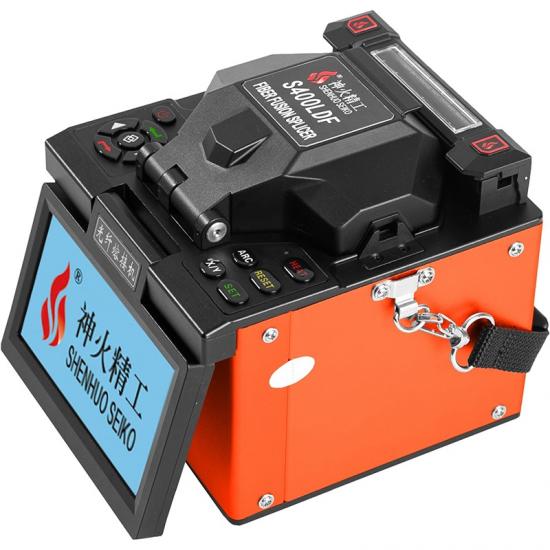
We are proud to introduce our flagship model for this sector: the Laser Source S400 LDF Large Diameter Fiber Fusion Splicer.

The S400 LDF is engineered specifically to handle the diverse requirements of laser source manufacturing and repair. Unlike bulky glass processing stations that are confined to laboratories, the S400 offers a portable, field-ready design without compromising on performance. It features a specialized clamping system and a wide electrode gap capable of generating the stable, high-power arc required to melt thick silica glass.

Key Technical Advantages

What sets the S400 apart in the crowded market of splicing tools?

  1. Versatile Cladding Support: The machine is designed to splice fibers with cladding diameters from 125μm up to 500μm. This covers the vast majority of gain fibers and passive delivery fibers used in commercial fiber lasers today.

  2. 6-Motor Precision Alignment: For specialty fibers, core alignment is non-negotiable. The S400 utilizes a 6-motor mechanism that adjusts the fiber position in the X, Y, and Z axes. This ensures that even if the fiber core is slightly concentricity error, the machine can align the light-guiding cores accurately to minimize loss.

  3. Cost-Effective Performance: Traditionally, equipping a workshop for fiber laser source repair required an investment rivaling the cost of a luxury car. The S400 disrupts this market by offering professional-grade LDF splicing capabilities at a fraction of the cost of Japanese or American competitors, making it accessible for third-party repair shops and smaller R&D labs.

Real-World Applications

The S400 is currently being used globally in two main sectors. First, in the R&D and laboratory environment, researchers use it to create high-power combiners and test new fiber geometries. Second, and perhaps most importantly, it is the workhorse for the after-sales service market. When a laser delivery cable is damaged on a factory floor, technicians equipped with the S400 can perform on-site repairs, restoring the laser to full power and saving the end-user thousands of dollars in replacement costs.


At Shenhuo Seiko, we believe that high-quality tools should be accessible to those who need them most. The S400 LDF represents our commitment to specialty fiber splicing technology, combining durability, precision, and affordability. Whether you are building the lasers of tomorrow or fixing the lasers of today, the S400 is ready to work.

If you are looking to upgrade your repair capabilities, explore the S400 LDF today and experience the Shenhuo Seiko difference.


In fields with extremely high requirements for polarization state stability, such as fiber optic communications, LiDAR, and quantum sensing, the splicing quality of Polarization-Maintaining Fiber (PMF) directly determines system performance. Traditional splicing equipment often faces pain points such as low alignment accuracy, high splicing loss, and complex operations when processing large-diameter, multi-type PMFs. The S500P1 Large Diameter Fiber Polarizing Welding Machine, with its professional design and powerful performance, provides a comprehensive solution for PMF splicing, from adaptability to stability. 


Core Advantages: Precise Adaptation, High Efficiency, and Stability

The S500P1 is not a general-purpose splicer but a professional device custom-built for "large diameter" and "polarization-maintaining" fibers. Its core advantages are reflected in three dimensions:
  • Multi-type Fiber Compatibility:It supports all types of PMF, including panda, bowtie, and elliptic types, while also being compatible with conventional fibers such as Single-Mode Fiber (SMF), Multi-Mode Fiber (MMF), and Dispersion-Shifted Fiber (DSF). It covers the full range of standards from G.652 to G.657, meeting the needs of complex scenarios.
  • Large Diameter Processing Capability:It can handle large-core fibers with cladding diameters of 125~500μm and coating diameters of 300~650μm, breaking through the adaptation limitations of traditional equipment for large-size fibers and providing support for applications such as high-power laser transmission and specialty sensing.
  • Low Loss and High Stability:The typical splicing loss is as low as 0.02dB (SMF) and 0.01dB (MMF), with a polarization extinction ratio of -30dB and a return loss of ≥60dB. This ensures the efficient maintenance of the polarization state at the splicing point, reducing signal attenuation and interference.


Functional Highlights: Flexible Operation, Intelligent Management

The design of the S500P1 fully considers users' practical operation needs, deeply integrating professionalism with convenience:
  • Independent End-Face Manual Alignment:It adopts a manual end-face observation and alignment system. The 200x magnification clearly presents fiber details, making the operation convenient and fast. It is particularly suitable for laboratory R&D and small-batch customized splicing scenarios, avoiding the adaptation limitations of automatic alignment systems for complex fiber structures.
  • Multiple Preset and Customizable Programs:It has 9 groups of factory preset programs built-in, covering common fiber types and splicing scenarios. It also supports user-defined programs (N groups), allowing users to optimize splicing parameters according to special fiber parameters (such as coating thickness and material) to achieve precise "one-fiber-one-strategy" splicing.
  • Intelligent Data Management:It can store 10,000 splicing records and 200 groups of splicing images, and supports screen recording of the splicing process, facilitating quality traceability and process optimization. The multi-language display (English and optional languages) lowers the threshold for cross-border team collaboration.


Technical Specifications: Reliable Guarantee Under Strict Environments

The performance of the S500P1 is not only reflected in splicing indicators but also in its adaptability to complex environments:
  • Environmental Adaptability:Operating temperature: -25℃~+50℃, humidity: <95% (non-condensing), altitude: 0-5000m. It can operate stably in harsh environments such as outdoors, high altitudes, and high humidity. Storage temperature: -40℃~+80℃, ensuring the equipment can be quickly put into use after long-term idleness.
  • Long-lasting Endurance and Durability:Equipped with a 12V 6.5Ah lithium battery and supporting AC 85-260V wide voltage input, it meets the needs of field operations and scenarios without mains power. The electrode life reaches 5000 discharges, reducing maintenance costs and downtime.


Application Scenarios: Full-Chain Coverage from Laboratory to Industrialization

  • Scientific Research Institutions:Used in universities and research institutes for the verification of new PMF structures and low-loss splicing in quantum communication experiments.
  • Industrial Manufacturing:Suitable for PMF splicing in fiber lasers, high-power amplifiers, and other equipment, ensuring polarization state stability and output power consistency.
  • Specialty Sensing:In systems such as fiber optic gyroscopes and Distributed Acoustic Sensing (DAS), it guarantees the polarization characteristics of sensing fibers, thereby improving measurement accuracy and signal-to-noise ratio.

The S500P1 Large Diameter Fiber Polarizing Welding Machine redefines the technical standards of PMF splicing with "professional adaptation, low-loss efficiency, and intelligent reliability" as its core. Whether addressing the physical challenges of large-core fibers or meeting the strict requirements of polarization maintenance, it provides solid technical support for fiber optic communications and laser applications, helping the industry break through performance bottlenecks and move towards a future of higher precision and reliability.

In the competitive world of optical manufacturing and industrial laser production, precision is the baseline, but efficiency is the differentiator. As the demand for high-power fiber lasers (ranging from 1kW to 20kW+) grows across the automotive, aerospace, and medical sectors, manufacturers face a critical bottleneck: the splicing of Large Diameter Fibers (LDF). Traditionally, handling these thick, complex fibers required equipment that cost as much as a small house. Today, that paradigm is shifting.

For production managers and R&D engineers, the challenge is clear. How do you maintain laboratory-grade precision on the factory floor without blowing your capital expenditure budget? The answer lies in choosing the right tools that balance advanced capability with practical affordability.

Shenhuo Seiko: Engineering Accessible Precision

At Shenhuo Seiko Nanjing Communication Technology Co., Ltd., we believe that high-end optical technology should not be exclusive to giant corporations. Located in Nanjing, a premier center for optical communications in China, Shenhuo Seiko has dedicated years to mastering the science of fiber fusion. We are not just an equipment supplier; we are a solution provider for the optical ecosystem. From FTTH tools to industrial-grade processors, our mission is to deliver "Seiko" quality—meaning exquisite detail and reliability—to every technician. We bridge the gap between expensive Western/Japanese imports and the growing need for cost-effective, high-performance local solutions.

The Technical Hurdle: Why Standard Splicers Fail

To understand the value of our specialized equipment, one must first understand the limitations of standard tools. A typical telecommunications fusion splicer is designed strictly for 125μm cladding fibers (standard SMF/MMF). When you attempt to splice a Double Clad Fiber (DCF) or a Large Mode Area (LMA) fiber used in lasers—which often boast cladding diameters of 250μm, 400μm, or even 500μm—standard machines fail physically and thermally. They lack the electrode gap width to heat the glass evenly, and their V-grooves cannot accommodate the sheer bulk of the fiber.

This mismatch forces many companies to outsource splicing or buy exorbitant "glass processing stations." However, there is a third, smarter option: the Large Diameter Fiber Fusion Splicer.

Meet the S400 LDF: Built for Versatility

Our solution to this industry-wide problem is the Laser Source S400 LDF Large Diameter Fiber Fusion Splicer.

The S400 LDF is designed to be the "Swiss Army Knife" for the fiber laser industry. It breaks the barrier of entry for working with specialty fibers. Here is why it is becoming the preferred choice for agile manufacturing and repair setups:

  1. Wide Range Capability (125-500μm): The S400 does not just handle one type of thick fiber; it spans the entire range. Whether you are working on a 20/400 Yb-doped gain fiber for a laser engine or a standard 10/125 delivery fiber, the S400 adapts. This flexibility reduces the need to own multiple machines for different production stages.

  2. Advanced 6-Motor Core Alignment: In high-power applications, cladding alignment is insufficient. If the cores are slightly offset, the resulting splice point will become a "hot spot," leaking light and eventually destroying the fiber. The S400 employs a sophisticated 6-motor alignment system that actively aligns the fiber cores (PAS technology), ensuring minimal loss and maximum power handling capability.

  3. Field-Ready Design: Unlike the heavy, stationary filament splicers often used for LDF, the S400 is compact and battery-operated. This means it can be easily moved from the R&D lab to the production line, or even packed into a van for on-site client repairs.

Maximizing ROI in Fiber Laser Manufacturing

For startup laser manufacturers or third-party repair services, Cash Flow is king. Investing $50,000 in a top-tier brand's splicer puts immense pressure on your margins. The Shenhuo Seiko S400 LDF offers a strategic advantage by delivering the necessary technical performance—stable low-loss splicing and high tensile strength—at a price point that accelerates your Return on Investment (ROI).

By integrating the S400 into your workflow, you gain independence. You no longer need to rely on external vendors for splicing services, and you can reduce the downtime associated with shipping damaged lasers back to the OEM. You gain full control over your quality and your timeline.

Conclusion

The optical industry is moving towards higher powers and more complex fiber geometries. Don't let your tooling holding you back. Whether you are developing the next generation of medical lasers or running a busy repair workshop, the S400 provides the power, precision, and cost-effective specialty fiber processing capabilities you need to succeed.

Trust Shenhuo Seiko to power your connections. Visit our product page to see the full specifications and take the next step in optimizing your production capabilities.

In the realm of modern optical communications and high-precision fiber sensing, the quality of a connection is often defined not just by how much light gets through, but by how little light bounces back. This is where the 8° Fiber Cleaver (often referred to as the 8-degree angled fiber cleaver) plays a pivotal role. Unlike standard cleavers that produce a flat 0-degree end face, this specialized tool is engineered to create an exact 8-degree angled surface, serving as a critical component in minimizing signal interference. 


The Principle: Precision Mechanics Over Simple Cutting

The fundamental difference between a standard cleaver and an 8° cleaver lies in the mechanical execution of the fracture. A standard cleaver simply scores and breaks the fiber to create a flat mirror-like surface. In contrast, the 8° fiber cleaver employs a more sophisticated three-step mechanism:

1. Clamping & Tensioning: The stripped optical fiber is first secured in a high-precision fixture and subjected to a specific amount of tensile force to ensure it remains perfectly straight and taut.

2. Angular Twisting: While under tension, the cleaver’s internal mechanism introduces a precise mechanical twist to the fiber. This aligns the fiber at an exact 8-degree angle relative to the cutting blade.

3. Scoring and Fracture: A diamond blade then scores the twisted fiber. Due to the pre-applied tension and angular orientation, the fiber fractures cleanly along the desired plane, resulting in a smooth, 8-degree angled end face without the need for polishing.


The Core Purpose: Eliminating Back Reflections

The primary motivation for using an 8-degree angle is to solve the physics problem of Return Loss (RL)—the amount of light that is reflected back toward the source.

When light traveling through a fiber core hits a flat (0-degree) end face, a portion of that light reflects straight back down the core, much like a mirror. These back reflections (or "echoes") can destabilize laser transmitters, increase bit error rates, and introduce noise into the system.

The 8-degree angle cleverly circumvents this issue. When light hits the angled end face, the reflected light is directed into the fiber's cladding rather than back into the core. This light is quickly attenuated and lost, preventing it from returning to the source. This mechanism allows APC (Angled Physical Contact) connections to achieve return loss values typically greater than 60dB, compared to the 30-50dB range of standard flat connections.

Key Applications in Modern Optics

The utility of the 8° fiber cleaver extends across several high-demand sectors: 

APC Connector Termination:The most common use is in the fabrication of APC connectors (identifiable by their green housings). Whether in data centers or telecom exchanges, these connectors require an 8-degree end face to ensure optimal performance in high-speed networks (such as GPON and RF video overlay). Fiber to the Home (FTTH):In field installations, technicians often use mechanical splice-on connectors (FAST connectors). High-quality mechanical splices rely on an 8-degree cleave to prevent signal degradation at the drop point.

High-Precision Sensing & Hydrophones:In sensitive environments like fiber optic hydrophone arrays or distributed acoustic sensing (DAS), even minute back reflections can corrupt the data being collected. The 8° cleaver is essential for manufacturing these sensors, ensuring that the sensing signal remains pure and free from internal optical noise.

Technical Comparison: UPC vs. APC

To fully appreciate the value of the 8° cleaver, it helps to compare the end results of the connections it enables versus standard connections:

Feature

UPC (Ultra Physical Contact)

APC (Angled Physical Contact)

End Face Geometry

Flat (0° angle)

Angled (8° angle)

Typical Return Loss

-50 dB to -55 dB

-60 dB to -65 dB

Reflection Behavior

Reflects light back to the source

Reflects light into the cladding

Primary Use Case

Digital data, general telecom

High-frequency RF, FTTx, Sensors

The 8° fiber cleaver is more than just a cutting tool; it is a fundamental enabler of signal integrity in advanced optical systems. By physically redirecting harmful reflected light, it ensures the stability of lasers and the accuracy of sensitive sensors. As optical networks continue to demand higher speeds and lower noise floors, the precision provided by the 8-degree cleave remains an indispensable standard in the industry.

The Ultimate Guide to Portable Laser Power Meters

In the world of photonics, precision is paramount. Whether you are aligning a complex optical system in a research lab or verifying the output of an industrial cutting laser, accurate measurement is the foundation of success. This is where the portable laser power meter becomes an indispensable tool.

Modern portable meters, such as the SH1000-A and SH1000-B series, have revolutionized how we measure light. They combine high-precision sensors with user-friendly handheld designs, allowing for on-the-go measurements without sacrificing accuracy.

Shenhuo Seiko: Engineering Accessible Precision
At Shenhuo Seiko Nanjing Communication Technology Co., Ltd., we believe that high-end optical technology should not be exclusive to giant corporations. Located in Nanjing, a premier center for optical communications in China, Shenhuo Seiko has dedicated years to mastering the science of fiber fusion. We are not just an equipment supplier; we are a solution provider for the optical ecosystem. From FTTH tools to industrial-grade processors, our mission is to deliver "Seiko" quality—meaning exquisite detail and reliability—to every technician. We bridge the gap between expensive Western/Japanese imports and the growing need for cost-effective, high-performance local solutions.

Key Features to Consider
When selecting a portable laser power meter, understanding the specifications is crucial. Based on current industry standards, here are the critical parameters you need to evaluate.
Spectral and Power Range
A versatile meter must cover the wavelengths relevant to your application. The latest generation of handheld meters typically covers a broad spectral range from 0.19 µm to 25 µm, encompassing UV, Visible, and IR spectrums.
Equally important is the power range. Different models are designed for different power levels:
Low Power (A-Series): Ideal for sensitive applications, measuring from 1 mW to 200 mW.
Medium Power (B-Series): Suitable for general alignment and testing, ranging from 4 mW to 600 mW.
High Power (C-Series): Designed for industrial outputs, capable of measuring from 25 mW to 1000 mW (1 W).
Measurement Accuracy and Stability
For a tool to be reliable, its readings must be consistent. High-quality portable meters offer excellent metrological characteristics:
Repeatability: Typically better than ±2%, ensuring that repeated measurements under the same conditions yield consistent results.
Linearity: Maintains accuracy across the dynamic range, usually within ±2%.
Power Accuracy: Generally falls between ±3% and ±5%, depending on the specific power range selected.
Detector Technology
The heart of any power meter is its detector. Most modern portable units utilize Calorimetric Detectors (often labeled as "CB" in specifications). These detectors are known for their flat spectral response and ability to handle higher power densities without damage.
The physical size of the detector aperture also varies to suit different beam sizes, with common diameters being 20 mm, 25 mm, and 55 mm. A larger aperture is essential for measuring expanded beams or beams with high divergence.
Operational Capabilities
Beyond basic power measurement, these devices are engineered for robust field use.
Damage Thresholds
One of the primary concerns when measuring high-intensity lasers is damaging the sensor.
Average Power Density: Can withstand up to 20 kW/cm² for 10 seconds in Continuous Wave (CW) mode.
Energy Density: Can handle up to 0.3 J/cm² for 1 ns pulse duration at 1064 nm.
Environmental and Physical Specs
These meters are built to last in demanding environments.
Operating Temperature: They function reliably in temperatures up to 125 °C.
Display: A TFT LCD screen (typically 170 × 320 pixels) provides clear visibility of data.
Portability: Powered by a rechargeable lithium battery, offering approximately 30 hours of standby time.
Connectivity: Modern units feature a USB Type-C interface for charging (5V/2A) and data transfer, making integration with PCs seamless.
Conclusion
The evolution of the portable laser power meter has made high-precision optical measurement accessible and convenient. By choosing a model with the appropriate power range, detector size, and accuracy specifications—such as the SH1000 or BK1000 series—you ensure that your laser systems are operating safely and efficiently. Whether for laboratory research or industrial maintenance, a reliable power meter is an investment in quality and safety.

In the demanding world of fiber optics, standard fusion splicers often struggle with the unique challenges posed by small-core special fibers. Whether you are working with complex telecommunications infrastructure, ruggedized military cables, or specialized sensing equipment, precision and reliability are non-negotiable.
Enter the S100TOF Small-Core Special Fiber Fusion Splicer by Shenhuo Seiko (Nanjing Shenhuo Jinggong Communication Technology Co., Ltd.). Engineered specifically for fibers with a cladding diameter of 50~80µm, this device is a powerhouse of accuracy, portability, and environmental adaptability.
This guide will walk you through the features, specifications, and why this machine stands out in the field.

Key Features: Precision Meets Practicality

The S100TOF is designed to ensure perfect alignment and low-loss splicing, even in the most challenging conditions.
  • Dual-Camera Core Alignment: Equipped with two high-resolution cameras, the S100TOF allows you to observe both the X-axis and Y-axis directions simultaneously. This ensures perfect fiber alignment every time.
  • Intelligent Arc Calibration: The splicer features real-time arc auto-calibration based on pressure, environment, and temperature parameters. You also have the option for manual calibration, giving you full control over the process.
  • Enhanced Visibility: A 4.3-inch LED color touch screen provides a clear display, supporting multiple customizable language modes. Additionally, the device features dual high-power lighting, making night operations and work in dark conduits effortless.
  • Robust Connectivity: The device comes with two USB ports—one for data transfer and another specifically designed to connect to external construction lighting. It also features two 12V power interfaces, allowing you to power the device from either the internal battery or an external power source simultaneously.

Technical Specifications

The S100TOF is built to handle a wide range of fiber types and environmental conditions.
表格
Parameter Specification
Model S100TOF
Applicable Fiber SM (Single Mode), MM (Multi Mode)
Core Diameter Range Cladding 50~80µm; Coating 60~100µm
Splicing Loss 0.02dB (SM); 0.01dB (MM)
Return Loss > 60dB
Electrode Life Typical 3000 times
Splicing/Heating Time 8~10s / 20s (Standard 60mm)
Data Storage 10,000 splicing records; 100 splicing images
Dimensions 130mm (W) x 154mm (D) x 130mm (H)
Weight 1.65KG (including battery)

Environmental Durability

One of the standout features of the S100TOF is its ability to operate in extreme environments.
  • Wide Operating Range: It functions reliably from -10°C to +50°C.
  • High Altitude & Wind Resistance: Rated for operation at altitudes from 0 to 5000m and can withstand wind speeds of up to 15m/s.
  • Humidity Tolerance: Operates in humidity levels below 95% RH (non-condensing).

Power & Portability

Designed for field technicians, the S100TOF balances power with portability.
  • Battery: Features a built-in 11.1V, 5200mAh Lithium battery.
  • AC Adapter: Universal input (AC100-240V, 50/60Hz) with output DC13.5/4.5A.
  • Compact Design: At just 1.65KG, it is lightweight enough for easy transport without sacrificing durability.

About the Manufacturer

Nanjing ShenhuoJingong Communication Technology Co., Ltd. is a leading manufacturer in the fiber optic industry. Located in the Jiangbei New Area of Nanjing, the company is dedicated to providing high-quality fiber optic solutions for global markets.
Contact Information:
Whether you are a field engineer or a network installer, the S100TOF offers the perfect blend of speed, accuracy, and ruggedness required for modern fiber optic networks.


High-power fiber lasers are everywhere these days — from cutting and welding in factories to medical surgeries and scientific labs. They're compact, efficient, and deliver excellent beam quality. But there's a catch: if you want to send that powerful laser beam over a long distance (say, to separate the laser source from the workpiece for flexible factory layouts), conventional solid-core fibers hit a wall.

Take a real example: Fujikura's ytterbium-doped fiber laser can transmit 5 kW over just 20 meters. Crank it up to 8 kW, and the distance shrinks to only 3 meters. The problem? Material damage thresholds and nasty nonlinear effects like self‑phase modulation or stimulated scattering.

That's where hollow-core fibers (HCFs) come in.

Instead of traveling through glass, the light zips through an air‑filled or vacuum core. Early experiments already showed that guiding light in air dramatically cuts nonlinearity and raises damage thresholds. Over the past decade, HCF performance has skyrocketed: losses have dropped from >100 dB/km to <1 dB/km in the best anti‑resonant designs — approaching ordinary silica fibers.

So how do they trap light inside an air hole? Solid‑core fibers use total internal reflection, but air has a lower refractive index than glass, so you need a trick. Two main tricks, actually:

1. Photonic bandgap (PBG) – A periodic microstructure in the cladding creates a "bandgap" that prevents light from escaping. The first practical hollow‑core fiber (HC-PBG-PCF) came out of Southampton in the late 1990s. But PBG fibers still have fairly high loss (dB/km scale) and are complex to make.
2. Anti‑resonant guidance – This is the current star. Thin‑walled glass tubes (often nested) act like a Fabry‑Pérot etalon, reflecting light back into the core. Anti‑resonant HCFs (AR-HCFs) offer wider transmission windows, lower loss, and simpler fabrication. Variants include Kagome, Revolver, node‑less, and nested anti‑resonant node‑less fibers (NANFs) – the latter holding the loss record today.

Why are these fibers such a big deal for high‑power and ultrafast lasers? Four key advantages stand out:

· Extremely low nonlinearity – The Kerr effect in air is ~1000× weaker than in glass. That means almost no self‑phase modulation, SBS, or SRS to mess up your beam. Even single‑frequency lasers can be transmitted without parasitic SBS.
· High damage threshold – Light barely touches the glass walls, so surface intensity stays low. You can push over 2 kW without harming the cladding microstructure. Some experiments ran for weeks at >100 mW with zero degradation.
· Broad spectral window – Wavelengths that are impossible for silica fibers (like mid‑IR 2–10 μm or deep UV) work beautifully in hollow‑core fibers. Skylark lasers transmitted >100 mW of UV, again for weeks.
· Low latency – Light in air travels about 31% faster than in glass (refractive index ~1 vs. ~1.45). That's crucial for telecom, but also for precision timing in ultrafast laser systems.

Real‑world results are already impressive.

In 2025, Shi et al. (Nature Communications) demonstrated 2 kW continuous‑wave laser transmission over 2.45 km using an AR-HCF with a record loss of 0.168 dB/km at 1080 nm. The power–distance product was 500× better than previous all‑fiber systems. They even observed Raman scattering inside the silica nested tubes – and managed to suppress it, opening the door to industrial applications like nuclear decommissioning and laser drilling.

Another study showed flexible transmission of mid‑infrared ultrafast pulses (2.8 μm, 100 fs, watt‑level energy) through a 5‑m evacuated hollow‑core PCF. The pulses kept their spatial, spectral, and temporal fidelity – perfect for spectroscopy, surgery, or remote sensing.

Of course, challenges remain.

· Residual loss – Though simulations hit 0.025 dB/km at 1550 nm and experiments reach 0.168 dB/km at 1080 nm, the 0.14 dB/km benchmark of silica isn't yet consistently beaten across all wavelengths.
· End‑face damage – Under high continuous power, the polymer coating and jacket glass (not the microstructure) can degrade. Air ionization inside the core may also limit power scaling.
· Mode purity – Hollow‑core fibers are inherently multimode. Recent designs with quadruple‑truncated dual‑nested structures achieve fundamental mode loss of 0.1 dB/km and high‑order mode loss of 430 dB/km (extinction ratio 5×10⁻⁴) – but maintaining single‑mode operation over long distances is still tricky.
· Fabrication repeatability – Stack‑and‑draw requires sub‑micron precision. Any variation in drawing conditions, pressure, or glass purity affects performance.
· Coupling to solid‑core fibers – Most high‑power laser sources are solid‑core, so efficient coupling demands precise mode‑field matching. Today's systems often use free‑space optics, which limits long‑term stability.

Looking ahead, the future is bright.

Triple‑nested anti‑resonant fibers (TNANFs) have already achieved 0.25 dB/km loss with smaller diameters. All‑fiber transmission (no free‑space coupling) is on the horizon – targeting 10 kW and beyond. Gas‑filled HCFs will continue to generate octave‑spanning supercontinua, VUV femtosecond pulses, and even tabletop attosecond X‑rays. Industrial integration with robot‑mounted flexible fibers is coming. And the market is growing: from $92 million in 2025 to $158 million by 2032 (CAGR 8.1%).


光线不是穿过玻璃,而是穿过充气或真空的核心。

If you want the best eye comfort, you should consider how each display affects your eyes over time. The TFT display module, especially in its reflective form, may reduce blue light exposure and help protect your eyes from irritation. Studies show that blue light from screens can lead to visual fatigue and even long-term damage, particularly in children.

  • Reflective TFT display modules may offer a safer alternative to traditional luminous displays.

  • Prolonged screen time increases the risk of discomfort and eye strain.

Factor

Description

Display Type

The technology behind the screen can impact ocular comfort and tear film stability.

Screen Brightness

High or low brightness levels can affect how comfortable your eyes feel.

Blinking Patterns

You tend to blink less when looking at screens, which can cause digital eye strain.

Prolonged Screen Time

Extended use, especially for work or study, adds to ocular stress.

You should pay close attention to brightness, contrast, color, flicker, blue light, and cost when choosing the right display.


Key Takeaways

  • Choose reflective TFT displays to reduce blue light exposure and enhance eye comfort during prolonged use.

  • Adjust brightness and contrast settings on your display to minimize glare and reduce eye strain.

  • Consider monochrome LCD displays for long reading sessions, as they emit less blue light and are easier on the eyes.

  • Utilize the 20-20-20 rule: every 20 minutes, look at something 20 feet away for 20 seconds to prevent eye fatigue.

  • Invest in displays with features like DC dimming and blue light filters to support your eye health and comfort.


Display Types Overview

What is a tft display module

You encounter the tft display module in many modern devices, such as smartphones, tablets, and industrial equipment. This technology uses thin-film transistors to control each pixel individually. You benefit from vibrant colors, sharp images, and fast response times. The tft display module supports millions of colors through RGB subpixels, making it ideal for applications that require rich visuals and dynamic content. You notice that this module offers high brightness and contrast, which enhances readability in various lighting conditions.

Tip: If you need a display for multimedia or interactive interfaces, the tft display module delivers superior performance.


Monochrome LCD display basics

You see monochrome LCD displays in calculators, digital watches, and simple control panels. This display type uses a passive matrix structure, which means it lacks transistors for individual pixel control. You observe only one color, usually black, white, or green, depending on the application. Monochrome LCD displays have a simpler design and fewer components, which makes them cost-effective and reliable for basic tasks. You rely on these displays when you need clear text or simple graphics without the distraction of color.


Visual differences

You can compare the two display types using the table below:

Feature

TFT Display Modules

Monochrome LCD Displays

Nature

Active display with transistors in each pixel

Passive display without transistors

Color Capability

Millions of colors via RGB subpixels

Single color output

Pixel Control

Individual control for brightness and color

Limited control, ON/OFF states

Image Quality

High resolution, vibrant colors

Monochrome, basic graphics

Response Time

Fast (around 80 ms)

Slower

Viewing Angles

Wide (approx. 130 degrees)

Narrower

Complexity

Advanced electronic circuits

Simple structure

  • You experience high-speed, high-brightness, and high-contrast effects with a tft display module.

  • You find monochrome LCD displays easier on the eyes for prolonged reading, but they lack the visual appeal of the tft display module.

Note: If you value image quality and color, the tft display module stands out. If you prefer simplicity and cost savings, monochrome LCD displays offer a practical solution.


Eye Comfort Comparison

Brightness and contrast

You notice that brightness and contrast play a major role in eye comfort during long viewing sessions. TFT display modules deliver higher brightness levels compared to monochrome LCD displays. You often see TFT screens in laptops and home appliances with brightness ranging from 200 to 300 nits. Industrial and embedded LCDs reach 300 to 500 nits, while high brightness TFT LCDs can exceed 700 nits and sometimes reach 1500 nits or more.

Display Type

Brightness Level (nits)

Typical Laptop/Home Appliance

200 - 300 nits

Standard Industrial/Embedded LCD

300 - 500 nits

High Brightness TFT LCD

700 - 1500 nits or higher


You benefit from adjustable brightness, which helps reduce glare and strain. Monochrome LCD displays usually offer lower brightness, making them suitable for environments where you want to avoid excessive glare. When you compare contrast ratios, monochrome LCDs can achieve higher ratios due to their simple design and material properties. Premium monochrome displays often exceed 1000:1, while industrial TFT LCDs range from 1000:1 to 1500:1. You experience sharper text and clearer images with higher contrast, which reduces strain during long viewing sessions.

  • Monochrome LCDs use liquid-crystal materials that enhance contrast.

  • TFT displays provide high contrast, improving detail visibility and minimizing glare.

Tip: Adjusting brightness and contrast on your display can help minimize glare and reduce eye strain, especially during long viewing sessions.

Monochrome LCD Display


Color and viewing angles

You rely on color accuracy and wider viewing angles for comfortable use. TFT display modules offer millions of colors, which improves color accuracy and visual appeal. You find that IPS panels maintain image quality and contrast across wider viewing angles, unlike standard TFT displays that may suffer from color and contrast degradation when viewed from the side. You benefit from a viewing cone greater than 160 degrees with TFT displays, while standard STN LCD displays require you to view from specific angles, such as 12, 3, 6, or 9 o'clock.

  • IPS panels deliver consistent color accuracy and wider viewing angles.

  • TFT displays enhance detail visibility with contrast ratios above 300:1.

  • Monochrome LCDs provide basic graphics and limited color accuracy, which can reduce strain for reading but lack visual richness.

You experience less glare and strain when you use displays with wider viewing angles and high color accuracy. During long viewing sessions, you notice that consistent color accuracy helps prevent eye strain and discomfort.


Flicker and DC dimming

You often encounter flicker in displays that use PWM dimming, which can cause eye strain and discomfort. TFT display modules with DC dimming offer a solution. DC dimming reduces flicker, making these displays considered least harmful to your eyes.

Display Technology

Dimming Method

Eye Comfort Impact

TFT with DC Dimming

DC Dimming

Considered least harmful to eyes

OLED

PWM Dimming

More harmful to eyes

You benefit from DC dimming because it minimizes strain and reduces the risk of headaches and visual discomfort. Monochrome LCD displays rarely use PWM dimming, so you experience less flicker. However, you may still face strain from prolonged use, especially if the display lacks proper brightness adjustment.

Note: Choosing displays with DC dimming can help you avoid digital eye strain and reduce glare during long viewing sessions.


Blue light and eye comfort

You face blue light emissions from most electronic displays, which can contribute to digital eye strain. Prolonged screen time exposes you to blue light, leading to symptoms such as dry eyes, irritation, and difficulty focusing.

Prolonged screen time can lead to digital eye strain, which includes symptoms such as dry eyes and discomfort. Blue light emitted from screens is a contributing factor to this strain.

Prolonged exposure to blue light can lead to digital eye strain, characterized by dry eyes, irritation, and difficulty focusing.

The potential digital eye strain induced by prolonged exposure to blue light emitted by digital screens is of particular interest, highlighting symptoms like eye fatigue and discomfort.


You notice that TFT display modules emit more blue light compared to monochrome LCD displays. You experience more strain and discomfort during long viewing sessions with TFT screens, especially if you do not use blue light reduction features. Monochrome LCD displays produce minimal blue light emissions, which helps reduce strain and eye fatigue.


You often complain about brightness, contrast, and blue light emissions when using TFT display modules. High resolution and clarity can minimize squinting and excessive focusing, reducing strain. With monochrome LCD displays, you may report visual discomfort, headaches, blurred vision, burning and dry eyes, and light sensitivity. You experience after-images and eye fatigue during extended use.

  • Prolonged use of visual display terminals can lead to symptoms such as eye pain, blurred vision, and dry eyes.

  • Physiological factors like inadequate tear secretion and ocular muscle metabolism contribute to strain and visual fatigue.

  • Frequent gaze switching between video and text can exacerbate strain and discomfort.

Tip: You can reduce eye strain by using displays with blue light reduction features and adjusting brightness to minimize glare.


Eye Comfort with IPS Panels

Benefits of IPS for eye comfort

You experience a noticeable improvement in eye comfort with ips panels. IPS technology uses a unique alignment of liquid crystals, which allows you to view the screen from wider angles without losing clarity or color accuracy. You see consistent brightness and contrast across the entire display. This uniformity reduces the need to adjust your viewing position, helping you avoid unnecessary strain.

You benefit from the benefits of ips displays because they minimize color distortion and maintain sharpness. You find that the benefits of ips lcds for eye health include reduced glare and less eye fatigue during extended use. IPS panels often feature anti-reflective coatings, which help you work comfortably in bright environments. You can rely on these panels for tasks that require precise color reproduction, such as graphic design or reading detailed charts.

Tip: You should choose IPS panels if you spend long hours in front of screens. The technology supports your eye health and comfort.


Comparing IPS TFT to monochrome LCD

You compare IPS TFT displays to monochrome LCDs by looking at several factors. IPS panels deliver vibrant colors and wide viewing angles, while monochrome LCDs provide basic visuals with limited color and narrower angles. You notice that IPS screens offer higher brightness and better contrast, which makes text and images easier to see.

Feature

IPS TFT Display

Monochrome LCD Display

Color

Full color spectrum

Single color

Viewing Angle

Wide (up to 178°)

Narrow

Brightness

High, adjustable

Lower, fixed

Eye Comfort

Enhanced

Moderate

You find that eye comfort with ips panels stands out, especially when you need to read or work for long periods. Monochrome LCDs reduce blue light exposure, but they lack the visual clarity and flexibility of IPS displays. You should weigh your needs for color, clarity, and comfort before making a choice.


TFT display module


Reducing Eye Strain in Daily Use

Usage scenarios

You encounter TFT display modules and monochrome LCD displays in many daily environments. TFT screens appear in consumer electronics, commercial signage, and industrial controls. Monochrome LCDs often show up in calculators, medical devices, and control panels. You rely on TFT displays for vibrant visuals and interactive interfaces, while monochrome LCDs provide clear text and simple graphics. The table below highlights typical applications:

Application Type

Conditions

Representative Brands

Industrial-grade

Extreme environments, safety-critical scenarios

Advantech, Beckhoff, Elo

Commercial-grade

Extended operation, custom features

LG, NEC, Planar

Consumer-grade

Home/office, limited budget, mild environment

Samsung, Dell, AOC

Monochrome LCDs offer excellent readability under ambient light and operate on low voltage. You benefit from their eye-friendly display features in situations where you need to minimize glare and avoid distractions.


User feedback on eye strain

You hear from users who prefer FHD IPS monitors for their eye-friendly display qualities. Many report reduced eye strain after switching to IPS LCDs, especially due to adjustable brightness and lower blue light emissions. One user noted a significant improvement in comfort after upgrading to an FHD IPS HDR monitor. You find that monochrome LCD displays also receive positive feedback for long reading sessions, as they emit minimal blue light and provide consistent clarity. You value these displays for their ability to reduce fatigue during extended use.

  • Users appreciate adjustable brightness and color consistency.

  • You notice fewer complaints about headaches and discomfort with eye-friendly display technologies.

Note: You should consider both display type and user feedback when choosing a screen for reducing eye strain.


Tips for reducing eye strain

You can follow several expert tips for reducing eye strain with both display types:

  1. Adjust brightness and contrast to match ambient lighting. Aim for 100-150 cd/m2 in office conditions.

  2. Use warm color temperature settings or software to lower blue light exposure.

  3. Enable DC dimming or flicker-free mode on TFT displays to minimize flicker.

  4. Take frequent breaks using the 20-20-20 rule: every 20 minutes, look at something 20 feet away for 20 seconds.

  5. Add ambient bias lighting in dark rooms to reduce strain from bright screens.

  6. Position light sources at a 90-degree angle to your screen to minimize glare and reflections.

  7. Use soft ambient lighting and avoid excessive brightness in your workspace.

Tip: You can create an eye-friendly display environment by combining proper settings and workspace adjustments. These tips for reducing eye strain help you maintain comfort during long sessions.


Cost and Choosing the Right Display

Price differences

When you compare display options, you notice that price can vary widely based on features and size. TFT display modules, especially those with ips technology, often cost more than basic monochrome LCD displays. You pay a premium for advanced features like touch capability, sunlight readability, and wide viewing angles. The table below shows typical price ranges for popular display types:

Display Type

Price Range

4.3" TFT Display Module

$21.02 - $24.20

3" EVE TFT Display

$51.62 - $59.44

4.3" Resistive Touchscreen TFT Display

$25.35 - $29.19

4.3" Capacitive Touchscreen TFT Display

$29.34 - $33.78

4.3" Sunlight Readable TFT Display

$17.99 - $20.71

5" Capacitive Touchscreen TFT Display

$45.88 - $70.75

2.8" 240x320 IPS TFT Display

$17.53 - $20.90

4" IPS TFT Display

$19.38 - $22.63

5.2-inch Bar-type TFT Display

$47.54 - $69.98

5" IPS Sunlight Readable Resistive Touchscreen TFT

$25.03 - $28.82

You find that monochrome LCD displays usually cost less because they use simpler technology and fewer components. If you want to maximize your budget, these displays offer a cost-effective solution for basic tasks.


Balancing budget and eye comfort

You need to balance your budget with your eye health when choosing a display. If you spend long hours in front of digital screens, you should prioritize features that support eye health. Look for ips displays with flicker-free technology and blue light filters. These features help reduce eye strain and protect your health during extended use.

  • Choose displays with adjustable brightness and blue light reduction.

  • Consider ips displays for wide viewing angles and consistent color, which support eye health.

  • Select monitors designed for productivity and comfort if you use digital screens for work or study.

  • Consult a healthcare professional if you experience eye discomfort before making a purchase.

You improve your eye health by investing in displays that use ips technology and blue light reduction. While these options may cost more, you gain better comfort and long-term health benefits. If you have a limited budget, monochrome LCD displays still provide a safe choice for eye health, especially for reading or simple tasks.

Tip: Always check for features that support eye health, such as blue light filters and flicker-free operation, before you decide on a display.


You gain better eye comfort with monochrome LCD displays for long reading sessions, while IPS TFT modules excel in color accuracy and clarity for vibrant visuals. Most studies show that certain display types reduce eye fatigue and support your well-being. To protect your eye health, follow these steps:

  • Adjust screen brightness and contrast.

  • Blink often and use the 20-20-20 rule.

  • Maintain proper distance and reduce glare.

  • Schedule regular eye exams.

You enhance your eye comfort by combining the right display choice with healthy habits.


FAQ

What display type is best for long reading sessions?

You should choose a monochrome LCD display for extended reading. It emits less blue light and reduces eye fatigue. You will find it easier to focus on text without distractions from color or glare.

Do TFT displays always cause more eye strain?

You may experience more eye strain with TFT displays if you use high brightness or lack blue light filters. Modern TFT modules with IPS panels and DC dimming can minimize discomfort. Adjust settings for optimal comfort.

How can you reduce blue light exposure on any display?

You can enable blue light reduction features or use software filters. Lowering screen brightness and using warmer color temperatures also help. Many devices offer built-in blue light modes for eye protection.

Are IPS panels worth the extra cost for eye comfort?

You benefit from IPS panels if you value wide viewing angles and consistent color. These panels reduce glare and maintain clarity, which supports eye comfort during long work or study sessions.

When you consider an OLED monitor, you should know the main disadvantages before making a decision. Many users mention shorter lifespan, burn-in risk, high cost, brightness nonuniformity, color fidelity issues, and lower pixel density as major OLED challenges.

Disadvantage

Description

Degradation of Organic Materials

Organic materials in OLED displays degrade over time, particularly blue-emissive pixels.

Color Balance Issues

Faster degradation of blue pixels can lead to color balance issues over time.

Image Retention and Burn-in

Static content can cause image retention or burn-in, especially problematic for desktop usage.

You may notice discomfort during productivity tasks or worry about maintaining your oled display screen to avoid burn-in. Users often find text less clear, and may question if the picture quality justifies the cost. Both amoled and pmoled screens share these issues, making them less ideal for some users.


Key Takeaways

  • OLED monitors have a shorter lifespan compared to LCDs, often lasting between 20,000 and 100,000 hours. Consider your usage habits before purchasing.

  • Burn-in risk is significant with OLED displays, especially when showing static images for long periods. Use screen savers and change content regularly to minimize this risk.

  • The higher cost of OLED monitors may not be justified for casual users. Evaluate whether the superior image quality meets your specific needs.

  • Brightness nonuniformity can affect your viewing experience, leading to uneven brightness across the screen. Be aware of this when using OLED for professional tasks.

  • Color fidelity issues can arise as OLED displays age, particularly with blue pixels degrading faster. Regular calibration may be necessary for accurate color work.


Shorter Lifespan of OLED

Causes of Degradation

You may notice that OLED monitors have a shorter lifespan compared to other display types. This disadvantage comes from the way organic materials inside the screen react to their environment. OLED displays use organic compounds that emit light when you apply an electric current. Over time, these materials break down, which leads to degradation.

  • Internal factors such as the formation of excitons can create reactive species. These species attack the organic layers, forming non-emissive spots on the screen.

  • External factors like oxygen and moisture can enter the display. When these elements reach the organic materials, they cause chemical reactions that reduce brightness and efficiency.

  • High temperatures also speed up degradation. If you use your monitor in a warm room or leave it on for long periods, you may see faster wear.

Both AMOLED and PMOLED screens experience these issues. You should know that even with recent improvements, OLED technology remains more sensitive to environmental stress than LCD or Mini-LED panels.


Impact on Daily Use

The shorter lifespan of OLED monitors can affect your daily experience in several ways. Most OLED displays last between 20,000 and 100,000 hours, depending on how you use them. LCD screens usually last from 30,000 to 60,000 hours. While new OLED models can match or exceed LCD lifespans, the risk of burn-in and ongoing degradation still exists.


If you use your monitor for work or gaming, you may notice color shifts or dimming after a few years. Blue pixels degrade faster, which can lead to color balance problems. You might see uneven brightness or faded images, especially if you keep static content on the screen for long periods.

Note: OLED panels show lower hardware failure rates than many LCDs, but burn-in and degradation remain concerns. Mini-LED monitors offer better brightness stability and almost no burn-in risk.

You should consider these disadvantages before choosing an OLED monitor. If you need a display for long-term, heavy use, the shorter lifespan and ongoing degradation may not fit your needs.


Burn-In Risk on OLED Display Screen

What Is Burn-In

Burn-in describes a permanent discoloration or ghost image that appears on your OLED display screen after displaying static images for long periods. You may notice faint outlines or shadows that do not disappear, even when you change the content. This issue happens because certain pixels age faster than others when they show the same image for extended times. OLED technology, including both amoled and pmoled screens, remains especially vulnerable to burn-in risk. The organic compounds in each pixel emit light directly, so repeated use of the same area causes uneven wear. You might also encounter temporary image retention, which looks similar but usually fades after a short time.

If you use your screen for tasks like editing documents, browsing the web, or gaming with static HUD elements, you increase the chance of burn-in. The risk grows when you leave static images on your OLED display screen for hours.

ultra thin flexible OLED display panel

How to Reduce Burn-In

You can take several steps to lower the burn-in risk on your OLED monitor. Manufacturers and experts recommend a mix of hardware and usage strategies:

  • Pixel Compensation Techniques: Modern OLED monitors use algorithms to adjust pixel voltages and emission times. These techniques help maintain uniform brightness and color, even as some pixels age faster.

  • Improvements in OLED Materials: Newer screens use more stable organic compounds and better layer structures. These changes slow down the aging process and make burn-in less likely.

  • Advanced Driving Schemes and Power Management: Features like pixel shifting move the image slightly at regular intervals. Adaptive brightness control and selective pixel activation also spread the workload across the screen, reducing stress on any single area.

  • Practical Usage Tips:

    • Lower your screen brightness when possible.

    • Use dark mode or screen savers to avoid static images.

    • Change the layout of frequently used apps to prevent static elements from staying in one spot.

By following these steps, you can enjoy the benefits of OLED while minimizing the risk of burn-in. Remember, even with these improvements, no OLED display screen is completely immune to burn-in risk, so regular care remains important.


Higher Cost of OLED Monitors

Price Comparison

You will notice that OLED monitors usually come with a higher cost than traditional LCD or Mini LED displays. This price difference results from several factors, including advanced technology and manufacturing challenges. The table below highlights the main cost drivers and manufacturing maturity for each display type:

Technology

Cost Factors

Manufacturing Maturity

LCD

Generally cheaper to produce due to mature processes and economies of scale.

Mature manufacturing processes.

OLED

Higher production costs, but decreasing as technology matures.

Emerging technology with improving yield rates.

Manufacturers invest heavily in new fabrication facilities and advanced materials for OLED panels. These investments increase the initial price. You may also see price fluctuations due to supply chain risks and currency volatility, especially since only a few companies produce most OLED panels. Competition from improved LCD alternatives, such as Mini LED, also affects pricing strategies.


Value for Money

You might wonder if the higher cost of OLED monitors is justified. Many users appreciate the superior image quality, deep blacks, and modern design that OLED offers. However, you should consider whether these benefits outweigh the disadvantages for your needs.

  • If you work in graphic design or video editing, you may find the color accuracy and contrast worth the investment.

  • For general office tasks or casual gaming, the higher cost may not provide enough extra value compared to a high-quality LCD or Mini LED monitor.

  • The risk of burn-in and shorter lifespan can make OLED less appealing for enterprise or heavy daily use.

Note: As OLED technology matures, panel longevity improves and production costs decrease. This trend may make OLED monitors more accessible in the future.

You should weigh the advantages against the higher cost and potential disadvantages before making a purchase. For many users, the premium price remains a barrier, but others find the visual experience worth the investment.


Brightness Nonuniformity in OLED Displays

Causes of Uneven Brightness

You may notice that your oled display screen sometimes shows uneven brightness across different areas. This issue, known as brightness nonuniformity, happens because each pixel in oled displays emits light independently. Manufacturing variations, aging of organic materials, and exposure to environmental factors like heat or moisture can cause some pixels to shine brighter or dimmer than others. Both amoled and pmoled screens experience these challenges. When you display static images for long periods, certain pixels may degrade faster, leading to visible differences in brightness. Unlike LCD panels, oled technology does not use a single backlight, so any inconsistency in pixel performance becomes more obvious. You may also see mura patterns, which look like cloudy spots or streaks, especially when viewing content with uniform backgrounds.

Brightness nonuniformity can become more pronounced as your screen ages or if you frequently use static images. This effect often appears alongside burn-in and image retention, making the display less reliable over time.


Effects on Viewing Experience

Brightness nonuniformity affects your viewing experience in several ways. If you work as a graphic designer or video editor, you rely on accurate visuals. Oled displays can show color shifts and brightness variations that disrupt your workflow. You may struggle to judge gradients or color consistency, especially when editing content with uniform backgrounds. These issues can lead to mistakes in color correction or layout design.

  • You may see visible mura patterns that distract from your work.

  • Color shifts can make it difficult to match tones across the screen.

  • Brightness variations reduce confidence in your final output.

Professional users often find these problems detrimental. Even casual users notice uneven brightness during everyday tasks. If you value visual accuracy, you should consider how brightness nonuniformity impacts your decision to use an oled monitor. While oled offers deep blacks and vibrant colors, the risk of burn-in, image retention, and uneven brightness remains a significant drawback.

OLED display screen

Color Fidelity Issues with OLED Displays

Color Accuracy Over Time

You may notice that color accuracy in oled monitors changes as the display ages. The organic materials inside oled displays degrade due to exposure to oxygen, moisture, and electrical stress. This degradation affects each color channel differently. Blue pixels in oled and amoled screens degrade faster than red and green, which causes a gradual shift in color balance. Over time, your monitor may display a yellowish tint or lose brightness uniformity. Chemical reactions and trapped electrical charges in the oled layers accelerate this process. If manufacturers use inferior materials, the degradation becomes more pronounced, reducing the display's quality and longevity.


Research shows that maintaining consistent color reproduction is a significant challenge for oled technology. You may experience color shifts, especially if you use your monitor at high brightness or in warm environments. LCD monitors do not face these issues to the same extent, making them more durable for extended use. The table below compares the effects of common factors on oled and LCD monitors:

Factor

Effect on OLED

Effect on LCD

Brightness

Higher brightness = Faster decay

Minimal impact

Static Images

Burn-in risk

No burn-in

Temperature

High heat speeds degradation

Backlight may dim


Impact on Professional Work

If you work in fields like graphic design, photography, or video production, color fidelity becomes critical. You rely on your monitor to display accurate colors for editing and proofing. Oled monitors offer rich colors and deep blacks, but the risk of color shifts and degradation can compromise your work. Uneven aging of blue pixels in oled and pmoled screens leads to color balance issues, making it difficult to maintain consistent results.

The table below highlights strengths and weaknesses of different display types for professional tasks:

Display Type

Strengths

Weaknesses

IPS

Reliable color accuracy, good for office work

May lack vibrancy compared to OLED

OLED

Rich colors, true blacks, superior HDR

Less reliable over time without calibration

You may need frequent calibration to correct color shifts in oled displays. If you depend on precise color reproduction, these issues can affect your workflow and output quality. Organic material degradation and differential aging make oled less suitable for tasks requiring long-term color stability. For professional use, consider whether the benefits of oled outweigh the potential drawbacks.


Lower Pixel Density Disadvantages

Comparison with Other Displays

When you compare OLED monitors to other display types, you will notice differences in pixel density. Pixel density, measured in pixels per inch (PPI), determines how sharp and detailed your images and text appear. Most commercial OLED displays for mobile devices reach impressive pixel densities, often between 600 and 800 PPI. Some specialized OLED panels can even approach 1,000 PPI. However, when you look at desktop OLED monitors, the numbers tell a different story.

  • A typical 4K resolution on a 27-inch monitor provides about 163 PPI.

  • QHD (2560 × 1440) at 27 inches delivers around 109 PPI, which many users find sufficient for gaming and general productivity.

  • Many OLED monitors for desktops do not match the ultra-high pixel densities seen in mobile devices.

LCD and Mini LED monitors often offer similar or higher pixel densities at comparable sizes and resolutions. You may find that OLED technology, while advanced in many ways, does not always lead in pixel density for larger screens.


Visual Impact

Lower pixel density can affect your viewing experience in several ways. When you use a monitor with fewer pixels per inch, you may notice that text appears less crisp. Fine details in images or videos can look slightly blurred or pixelated, especially if you sit close to your screen. This becomes more noticeable during tasks that require precision, such as graphic design or photo editing.

If you value sharpness and clarity, you should pay attention to pixel density specifications before choosing an OLED monitor.

For everyday use, lower pixel density may not bother you. However, if you work with detailed visuals or prefer ultra-sharp text, you might feel disappointed by the softness in some OLED monitors. High pixel density remains essential for professionals who demand the best image quality. Always consider how your typical tasks will look on a display before making your decision.


When you consider an OLED display screen, you face several disadvantages that can impact your choice.

  • Burn-in remains a concern, especially if you use static images or high brightness for long periods.

  • The cost of OLED displays and pmoled panels is higher than LCD alternatives, which may not suit budget-conscious users.

  • Shorter lifespan, vulnerability to humidity, and ongoing burn-in risk can limit durability.
    You should weigh these factors and follow expert tips to reduce burn-in before investing in an OLED monitor.


FAQ

What causes OLED burn-in?

Burn-in happens when you display static images for long periods. Certain pixels age faster, creating permanent marks. You can reduce this risk by using screen savers and changing content regularly.

How long does an OLED monitor typically last?

Most OLED monitors last between 20,000 and 100,000 hours. Usage habits, brightness settings, and environmental factors affect lifespan. You should check manufacturer specifications for accurate estimates.

Are OLED monitors suitable for professional color work?

OLED monitors offer vibrant colors. However, color accuracy can degrade over time. You may need frequent calibration for tasks requiring precise color reproduction, such as graphic design or video editing.

Can you fix brightness nonuniformity on an OLED screen?

You cannot fully fix brightness nonuniformity. Manufacturers use compensation algorithms to minimize the effect. You may notice improvement with regular pixel refresh cycles, but some unevenness remains.

Why do OLED monitors cost more than LCD monitors?

OLED monitors cost more due to advanced materials and complex manufacturing processes. Production yields remain lower than LCDs. You pay a premium for deeper blacks and superior contrast.

You often hear about the pros and cons of OLED when shopping for a new display. OLED stands out for its vivid colors, accurate black levels, and thin, flexible design. You get wide viewing angles and fast response times, which enhance your viewing experience. At the same time, OLED faces challenges such as a shorter lifetime, risk of burn-in, and higher manufacturing costs. The table below highlights the most commonly cited strengths and weaknesses:

OLED Pros

OLED Cons

Thin, flexible design

Shorter lifetime

Wide viewing angles

Higher cost

Vivid colors, deep blacks

Burn-in risk

Fast response time

Brightness issues

As you explore OLED, consider how these features align with your needs.


Key Takeaways

  • OLED displays offer vibrant colors and deep blacks, enhancing your viewing experience.

  • Consider the shorter lifespan and higher cost of OLED when making a purchase decision.

  • Avoid burn-in by changing content regularly and not leaving static images on the screen.

  • Evaluate your viewing environment; OLED performs best in dimly lit rooms.

  • For dynamic content like movies and games, OLED provides superior performance.


what is oled?

0.49-inch diagonal PM-OLED display screen

OLED stands for Organic Light-Emitting Diode. You encounter this technology in modern TVs, smartphones, and monitors. OLED displays use organic materials to produce light, which sets them apart from traditional LCD and LED screens. You benefit from OLED’s ability to deliver high contrast and vibrant colors because each pixel emits its own light. This section explains how OLED works and the types of OLED displays you might find.


how oled works

You see OLED technology operate through a unique process. When you apply a positive voltage to the anode and a negative voltage to the cathode, a strong electric field forms. This field attracts holes from the anode and electrons from the cathode. These charge carriers move through their respective transport layers and reach the emissive layer. Here, they recombine and form excitons, which release energy as light. The color depends on the energy gap of the organic materials used.

OLED panels contain several layers, each with a specific function. You can review the main layers in the table below:

Layer Type

Function

Encapsulation Materials

Protect organic layers from water and oxygen; include light extraction materials.

Cathode Evaporation Materials

Serve as the negative electrode for electron injection.

Electron Transport Layer (ET)

Facilitates electron transport to the emissive layer.

Hole-Blocking (HB) Materials

Enhance emission efficiency by transporting carriers.

Emissive Layer (EM)

Contains red/green/blue materials that emit light when excitons recombine.

Electron-Blocking (EB-Prime)

Improve efficiency by preventing electrons from recombining prematurely.

Hole Transport Layer (HT)

Assist in the transport of holes to the emissive layer.

Hole Injection (HI) Materials

Aid in the injection of holes from the anode.


oled display types

You find several types of OLED displays, each suited for different applications. The most common types include:

  • Passive-matrix OLED (PMOLED): You see these in small screens, such as wearable devices and simple displays.

  • Active-matrix OLED (AMOLED): You encounter these in smartphones, TVs, and monitors. AMOLED offers better control and higher resolution.

  • Transparent OLED: You notice these in futuristic displays, where transparency is needed for design or advertising.

  • Flexible OLED: You benefit from these in foldable phones and curved screens, thanks to their bendable structure.

When you compare OLED to LCD and LED, you notice key differences. OLED screens let each pixel emit light independently, which results in deep blacks and high contrast. LCD screens rely on a backlight, so they cannot achieve the same level of color accuracy or contrast. OLED panels use organic materials and are thinner, while LCD panels use liquid crystals and require a backlight.


pros and cons of oled

oled pros overview

You encounter many key advantages when you choose OLED technology. OLED panels deliver impressive performance and design flexibility. You notice that the pros and cons of OLED often center on picture quality, energy efficiency, and innovative features. Here are the main benefits you experience:

  1. Thin and flexible panels: OLED displays can be less than 1 mm thick. You gain access to curved, foldable, and even rollable screens.

  2. Wide viewing angles: You see consistent colors and contrast from almost any position, with angles close to 180°.

  3. Vivid colors and accurate black levels: OLED produces high color saturation and true blacks. Each pixel emits its own light and can turn off completely.

  4. Fast response times: You enjoy microsecond-level response, which reduces motion blur and enhances gaming or sports viewing.

  5. Good low-temperature performance: OLED operates reliably in harsh environments, even down to -40°C.

  6. Energy efficiency for dark content: You save power when displaying dark images. OLED pixels turn off individually, cutting power usage by about half in dark mode.

  7. Simpler fabrication potential: OLED manufacturing could become easier, which may lower costs in the future.

  8. Transparent display potential: You benefit from new applications, such as see-through screens for retail or automotive use.

OLED stands out for its ability to deliver deep blacks, vibrant colors, and flexible designs. You find these features especially valuable in premium TVs, smartphones, and innovative devices.

Display Type

Energy Efficiency

Key Features

OLED

Superior when displaying dark content

Pixels emit light individually and can turn off completely

LCD

Requires constant backlighting

Consistent power usage regardless of content

You see that OLED displays use less power for dark content, while LCD panels consume most of their energy for backlighting regardless of what you view.


oled cons overview

You also need to consider the trade-offs when evaluating the pros and cons of OLED. OLED technology faces several challenges that affect durability, cost, and performance. Here are the main disadvantages you encounter:

  1. Shorter lifetime: Organic materials degrade from exposure to oxygen and moisture. You may notice that OLED panels last around 5,000 hours, which is less than many LCD screens.

  2. Higher manufacturing cost: OLED production uses expensive organic materials and precision equipment. You pay more for OLED devices compared to other display types.

  3. Brightness nonuniformity: Individual OLED pixels age differently. You might see uneven brightness across the screen over time.

  4. Color fidelity issues: Some OLED materials shift color as they age. You may experience changes in color purity.

  5. Lower pixel density (relative): Certain OLED panels offer fewer pixels per inch than LCDs. You could see less sharpness in some models.

  6. Burn-in risk: Static images can cause uneven aging and image retention. You need to avoid leaving the same image on screen for long periods.

You weigh these pros and cons of OLED carefully before making a purchase. OLED excels in picture quality and design, but you must consider its lifespan, cost, and potential for burn-in.

You find that OLED offers remarkable features, but you need to balance these benefits against the trade-offs. Your choice depends on how much you value image quality, design flexibility, and energy efficiency compared to durability and price.


oled pros explained

high contrast and deep blacks

You experience unmatched contrast when you choose oled displays. Each pixel emits its own light, so you see perfect blacks and infinite contrast ratios. Unlike LCD or QLED panels, oled can turn off individual pixels, which means black levels reach 0 cd/m². This ability delivers perfect blacks and makes hdr content look stunning. The table below shows how oled outperforms other technologies in black levels and contrast:

Panel Type

Black Level (cd/m²)

Contrast Ratio

OLED

0

Inf:1

QLED

0.00925

10528:1

LED

0.021

4786:1

You notice that oled achieves perfect blacks and vivid hdr, making every scene pop with detail and depth.


wide viewing angles

You enjoy consistent color and contrast from almost any position with oled. The technology emits light in all directions, so viewing angles remain wide and accurate. You do not see color or brightness loss, even when viewing from the side. This makes oled ideal for group settings or wide seating arrangements. In comparison, QLED and LCD panels often show color and contrast shifts when you move off-center.

  • oled displays maintain color accuracy and black levels at steep viewing angles.

  • QLED and LCD panels lose color fidelity and contrast when viewed from the side.

You always get the best viewing experience, no matter where you sit.


fast response times

You benefit from fast pixel response times with oled. Each pixel changes state in microseconds, which means you see smooth motion and sharp images. This speed eliminates motion blur, making oled perfect for gaming, sports, and action movies. LCD and Mini-LED panels cannot match this performance, as their response times range from 1 to 8 milliseconds. You get a clear advantage with oled for fast-paced content.


thin and flexible design

You find oled display panels incredibly thin and flexible. Manufacturers can create displays as slim as 0.97 mm, which allows for sleek, modern designs. You see oled used in curved, foldable, and rollable screens. The absence of a backlight gives you more design freedom and lighter devices. LCD panels, by comparison, are thicker and less adaptable.

Panel Type

Minimum Thickness

OLED

0.97 mm

LCD

0.3 mm - 2 mm

You enjoy both aesthetics and practicality with oled’s thin profile.


large size options

You have access to some of the largest display sizes with oled. Commercially available oled screens reach up to 88 inches, surpassing the maximum size of most LCD panels. This makes oled a top choice for home theaters and large venues.

Technology

Size (inches)

OLED

88

LCD

55

You can create an immersive viewing environment with oled, enjoying perfect blacks, high contrast, and vibrant color on a grand scale.


oled cons explained

burn-in issues

You face burn-in as a major concern with oled displays. Burn-in happens when static images remain on the screen for long periods, causing permanent discoloration. You see this issue most often with logos, interface elements, or news tickers. LG reports that burn-in is rare for average users and usually occurs under extreme conditions, such as high brightness and prolonged static images. Roland Wooster from VESA notes that the worry about burn-in often exceeds its actual impact, thanks to improvements in material longevity. RTINGS conducted a long-term study and found that newer oled panels handle burn-in much better. If you use varied content, you should not worry about burn-in risk. You still need to avoid leaving static images on the screen for hours to prevent burn-in. You notice that burn-in can affect both brightness and color uniformity, making the display less appealing.

  • Burn-in appears as faded areas or color shifts.

  • You reduce burn-in by lowering brightness and changing content regularly.

  • Burn-in affects oled more than LCD or QLED panels.


shorter lifespan

You encounter a shorter lifespan with oled panels compared to other display types. Organic materials degrade over time, especially with exposure to oxygen and moisture. You see oled panels lasting around 3 to 6 years in practical use, mainly due to burn-in and material breakdown. LCD panels typically last between 30,000 to 60,000 hours, while QLED panels reach 50,000 to 80,000 hours. The table below shows average lifespans:

Panel Type

Average Lifespan (hours)

OLED

100,000

LCD

30,000 - 60,000

QLED

50,000 - 80,000

You notice that oled’s lifespan depends on usage habits, brightness settings, and environmental factors.


higher cost

You pay a higher price for oled technology. Manufacturing oled panels requires expensive organic materials and precision equipment. You see oled TVs and monitors priced above similar LCD and QLED models. The price reflects the advanced features, but you must decide if the benefits outweigh the cost. You also consider that replacement costs may be higher due to shorter lifespan.


brightness limits

You experience brightness limits with oled displays. OLED panels typically reach peak brightness levels of 1,000 to 1,300 nits. Mini-LED displays achieve superior brightness, often exceeding 3,000 nits. LED and QLED TVs can deliver higher brightness for small highlights, but struggle to maintain peak brightness across the entire screen. OLEDs use an Automatic Brightness Limiter (ABL), which reduces brightness in certain scenarios to protect the panel. You notice that high brightness can accelerate burn-in and shorten lifespan. The table below compares peak brightness:

Display Type

Peak Brightness (nits)

Mini-LED

1,000 - 3,000+

OLED

1,000 - 1,300

You find that oled works well in dim rooms, but may not perform as well in bright environments.


humidity sensitivity

You must protect oled panels from humidity. Exposure to moisture above 50% causes degradation, including delamination, oxidation, and crystallization. Oxygen and water vapor penetrate the encapsulation barrier, leading to non-emissive dark spots, reduced brightness, and color shifts. Over time, these defects accumulate and may cause display failure. High humidity complicates lifespan predictions, and traditional testing methods become unreliable. You see that research aims to improve testing protocols for oled longevity under humid conditions.

Effect

Description

Degradation Mechanisms

OLED components degrade when exposed to humidity levels above 50%, leading to issues like delamination, oxidation, and crystallization.

Lifespan Measurement Challenges

High humidity complicates lifespan predictions due to the extreme sensitivity of OLED materials to moisture.

Synergistic Effects

Current models fail to accurately predict the combined effects of humidity, temperature, and electrical stress on OLED longevity.

Encapsulation Issues

Traditional testing methods become unreliable in high humidity, leading to potential catastrophic failures.

Methodology Development

Research aims to create standardized testing protocols for OLED lifespan under high humidity conditions.

You need to consider humidity sensitivity when choosing oled for environments with high moisture.


oled vs other displays

0.54-inch diagonal PM-OLED display screen

oled vs qled

You often compare oled vs qled when choosing a premium display. Qled technology uses quantum dots and a backlight to boost brightness and color volume. You notice that qled TVs generally achieve higher brightness levels than oled, which makes them ideal for rooms with lots of ambient light. Oled excels in color accuracy because each pixel emits its own light, producing true black levels and high contrast. You see qled offering a wider color gamut and better color volume, especially at higher brightness. However, oled delivers more precise blacks and superior contrast.

  • Oled provides perfect blacks and high contrast.

  • Qled delivers higher brightness and vibrant colors at peak levels.

  • Oled vs qled often comes down to your environment and viewing habits.

  • Qled performs best in bright spaces, while oled shines in dark rooms.


oled vs lcd

You see clear differences between oled and lcd displays. Oled screens emit light through organic compounds, allowing independent pixel illumination. LCD screens rely on a constant backlight, which stays on whenever the display is active. Oled can turn off individual pixels, leading to zero power consumption for black pixels. LCD requires constant backlighting, resulting in higher power usage regardless of the content.

  • Oled reduces power consumption by up to 65% in dark-themed use.

  • LCD maintains high power usage due to backlight waste.

  • Oled can drop power consumption to about 15% of peak usage in dark scenes.

  • LCD remains at 80% or more because of backlight limitations.
    You benefit from oled’s efficiency and superior black levels, while lcd offers consistent brightness and lower cost.


oled vs mini-led

You compare oled vs mini-led to evaluate black level performance and local dimming. Mini-led uses thousands of small LEDs for improved local dimming, but still relies on a backlight.

Oled technology is superior in achieving true black levels because it is self-emissive, allowing each pixel to turn off completely. This results in theoretically infinite contrast ratios. In contrast, Mini-LED, while it has improved local dimming with numerous zones, still uses a backlight, which can cause light leakage and blooming effects around bright objects on dark backgrounds.

You experience deeper blacks and higher contrast with oled. Mini-led offers greater brightness and fewer blooming issues than traditional LCD, but cannot match oled’s pixel-level control. You choose oled for cinematic experiences and mini-led for bright environments.


is oled right for you?

buying factors

You need to evaluate several factors before purchasing an oled display. Your viewing environment plays a crucial role. Oled TVs typically reach 700-800 nits for HDR and 400-500 nits for SDR, so check brightness levels if you watch in a well-lit room. Gamers benefit from a refresh rate of 120Hz and HDMI 2.1 support. Price remains higher than LED TVs, but last year's models often offer better deals. Sound quality varies between models. If you do not plan to use external speakers, ensure the internal audio meets your needs. Input lag matters for gaming; look for models with lag under 20ms. Newer image processors improve picture quality. Additional features, such as streaming service access and device compatibility, enhance your experience.

Factor

Description

Brightness Levels

Check for adequate brightness for your room.

Maximum Refresh Rate

120Hz and HDMI 2.1 support benefit gamers.

Price

Consider last year's models for savings.

Sound Quality

Evaluate internal speakers if not using external audio.

Input Lag

Seek models with lag under 20ms for gaming.

Image Processor

Newer processors deliver better visuals.

Additional Features

Streaming and device compatibility add value.


best uses

You achieve the best results with oled when you use it for dynamic content. Oled excels in displaying movies, sports, and games where images change frequently. Art galleries benefit from oled displays due to superior color accuracy and deep blacks. You enjoy vibrant visuals and true blacks, making oled ideal for cinematic experiences and creative presentations.

  • Dynamic content such as movies, sports, and games

  • Art galleries requiring color accuracy and deep blacks

  • Home theaters seeking immersive visuals

Tip: Avoid using oled for content with persistent static elements, such as fixed logos or interface icons.


who should avoid oled

You should avoid oled if you are sensitive to flicker or blue light emissions. Individuals who experience discomfort from PWM flicker may find oled displays unsuitable. Environments with low ambient light can increase discomfort due to high contrast. If you are prone to eye strain, headaches, or migraines, oled may not be the best choice.

  • Users sensitive to flicker or blue light

  • Individuals experiencing discomfort from PWM flicker

  • People prone to eye strain, headaches, or migraines in low-light settings

You make a better decision by considering your viewing habits, environment, and sensitivity to display characteristics.


You have seen that OLED delivers supreme contrast, wide viewing angles, and a slim design, but you must weigh these against higher costs and potential brightness limits.

Advantages of OLED

Drawbacks of OLED

Supreme Contrast & Deep Blacks

Brightness Limitations

Wide Viewing Angles

Potential for Burn-In

Fast Response for Gaming

Higher Price for Large Sizes

Slim, Elegant Design


  • Consider your budget, room lighting, and content habits before choosing.

  • If you value picture quality in dark rooms, OLED suits you.

  • For bright spaces or cost concerns, explore alternatives.

Modern OLED panels have improved durability and burn-in resistance. If you remain uncertain, consult industry publications or display experts for the latest guidance.


FAQ

What causes OLED burn-in, and how can you prevent it?

Burn-in happens when static images stay on the screen for long periods. You can prevent it by lowering brightness, using screen savers, and changing content often. Avoid displaying logos or static elements for hours.

Is OLED safe for gaming?

You can use OLED for gaming. Fast response times and low input lag give you a smooth experience. To avoid burn-in, change game content regularly and use built-in pixel refresh features.

How does OLED handle bright rooms?

OLED works best in dim or moderate lighting. You may notice glare or reduced brightness in very bright rooms. For sunlit spaces, consider displays with higher peak brightness, such as QLED or Mini-LED.

Can you clean an OLED screen with regular cleaners?

You should not use regular cleaners. Use a microfiber cloth and a small amount of water. Avoid harsh chemicals, as they can damage the organic layers.

Does OLED consume more power than LCD?

OLED uses less power for dark content because pixels turn off. For bright images, power use can match or exceed LCD. Your usage habits affect overall energy consumption.